Spiky's calendar integration connects Google Calendar or Outlook Calendar, so Spiky Scribe joins and records the meetings you choose, and stays out of the rest.
- MON 10:00Lumen Retail · discovery callScribe joins
- MON 14:00Weekly pipeline reviewSkipped
- TUE 09:301:1 with DanaSkipped
- TUE 15:00Brightline · pricing follow-upScribe joins
- WED 11:00Vendor webinarScribe joins
- THU 10:00Helios · technical validationScribe joins
- THU 16:00Company all-handsSkipped
- FRI 13:00Kestrel Bank · legal redlinesScribe joins













 4.8 / 5
How it works
How the calendar integration works.
Once your calendar is connected, Spiky Scribe joins and records your scheduled meetings directly from it. Nobody has to remember to press record.
Connect Google or Outlook
Sign in to your calendar from Spiky. Your upcoming meetings appear in Spiky, and Scribe can see which ones to join.
Pick which meetings to record
One rule decides which meetings Scribe joins. Change it whenever you like, or switch a single meeting on or off.
Scribe joins from your calendar
Spiky Scribe joins and records the scheduled meeting. The transcript, summary and action items are ready after the call.
The six rules
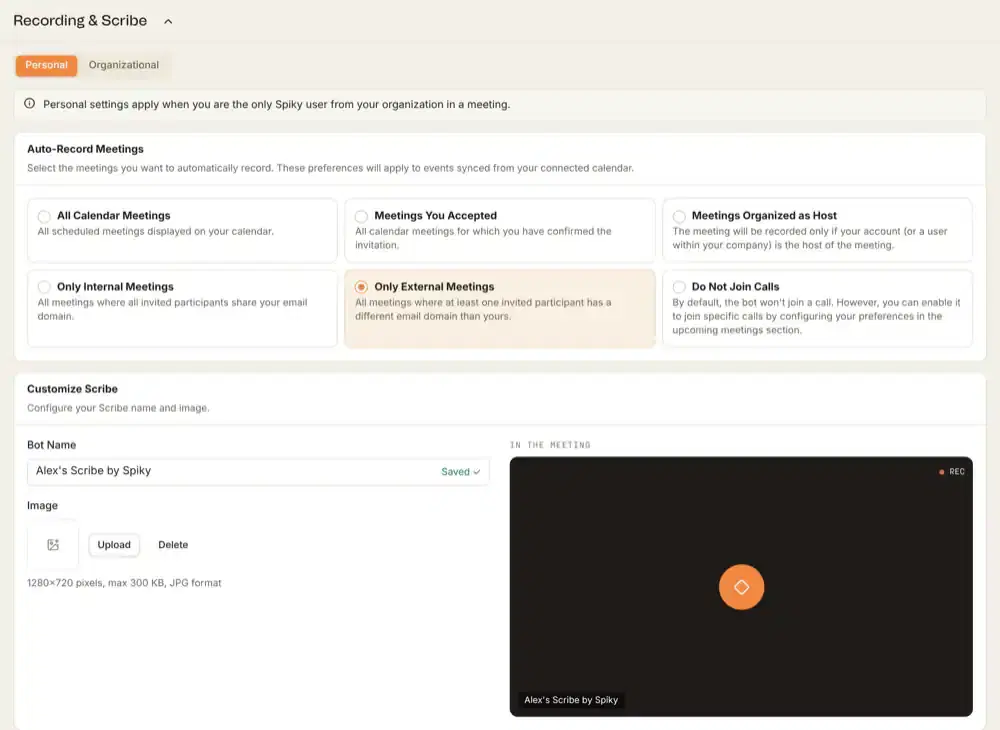
Choose which calendar meetings get recorded.
One rule for you, one for the organization.
Personal settings apply when you are the only Spiky user from your organization in a meeting. Organizational settings apply when several of you are in the same meeting, and an admin can make the organizational rule the only one.
- All calendar meetings, or only the ones you accepted
- Only meetings your company hosts
- Only internal, or only external, by email domain
- Do not join calls, and switch Scribe on meeting by meeting
Per meeting
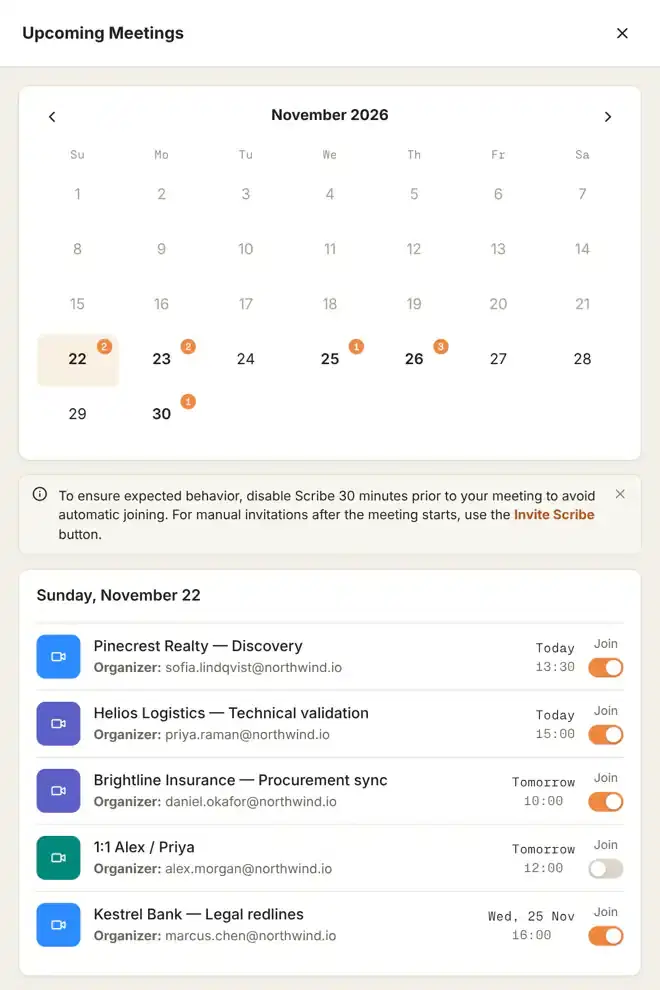
A switch on every upcoming meeting.
Fine-tuned control, meeting by meeting.
Beyond the general rule, each meeting on your calendar has its own switch, so you can turn recording off for one session before it starts. The month view shows how many meetings each day holds.
- A join switch beside every upcoming meeting
- Turn it off at least 30 minutes before the meeting
- Invite Scribe to a call in progress by pasting its link
What it adds
What a connected calendar adds to every meeting.
Scribe goes in your place
If you cannot join a meeting that is on your calendar, Spiky Scribe joins on your behalf and you read the notes afterwards.
Accurate participant analysis
With the calendar connected, Spiky gathers participant data more precisely than from a manual upload: clearer speaker intervals and who is who.
Everyone is told
An automatic notice is sent before the meeting. If a participant leaves within the first four minutes, no recording is kept.
A name and image of your own
Give Scribe a name and an image, so it shows up in the meeting the way you want it to.
Calendar integration is on every plan, including Free.
Spiky Scribe, transcription and meeting summaries are on every plan too. Prefer no bot in the call? The desktop app records without one on Plus, Pro and Premium.
Customers
What customers say.
“Spiky makes it easy to coach the reps and ensure they correctly pitch our products. It is a valuable tool for improving our conversion rates throughout the funnel by more quickly qualifying leads. It has several handy features like a summary of the following steps and easy-to-understand analytics on performance.”
 Drew OlsenHead of GTM · Gynger.io
“My favorite feature of the Spiky platform is the detailed transcription it provides. The ability to capture all communication during an online meeting allows me to focus on the interaction rather than taking notes. The sentiment analysis is constructive in determining critical moments in meetings.”
 Jacob CheathamChief Strategy Officer · Venom Strategies
“The insights provided by Spiky are game-changing for Salesforce. The insights delivered hold power to enable and empower sales executives to empathize more with their customers, thereby understanding their value proposition and needs more deeply. This will ultimately lead to more sales conversions if used correctly.”
 Teijas KyHead of Business Development and Strategic Partnership · Wakelet
FAQ
Questions about the calendar integration.
Which calendars does Spiky connect to?
Google Calendar and Outlook Calendar. Spiky suggests connecting a work calendar.
Which meetings does Spiky Scribe join?
The ones your rule covers. There are six: all calendar meetings, meetings you accepted, meetings organized as host, only internal meetings, only external meetings, or do not join calls. You can change the rule at any time in your settings.
Can I stop Scribe from joining one meeting?
Yes. Every upcoming meeting has its own switch. Turn it off at least 30 minutes before the meeting starts so Scribe does not join automatically.
What if a meeting is not on my calendar, or has already started?
Use Invite Scribe and paste the meeting link. Scribe joins the ongoing call and analyzes it like any other meeting.
Can an admin set one rule for the whole company?
Yes. Organizational settings apply when several Spiky users from your organization are in the same meeting, and an admin can turn off personal recording preferences so the organizational rule is used for all meetings.
Are participants told that the meeting is recorded?
Yes. An automatic notice is sent before the meeting, Scribe appears in the call as a named participant, and if a participant leaves within the first four minutes no recording is kept.
Which meeting platforms does it work with?
Zoom, Microsoft Teams, Google Meet and Webex.
Which plans include calendar integration?
Every plan, including Free. Spiky Scribe, transcription and meeting summaries are on every plan too.

Start with your calendar
Connect a calendar and record your next meeting.
It takes a sign-in. Scribe joins the meetings your rule covers, and the notes are waiting when the call ends.