Spiky Pulse turns every recorded conversation into a speaker-separated transcript, a summary in timestamped sections and a list of action items with owners, so nobody takes notes during the call.
- Priya Raman47%
- Rachel Torres29%
- Marcus Chen15%
- Tom Becker9%
- PEOPLE
- 4
- SECTIONS
- 3
- ACTION ITEMS
- 3
- LANGUAGE DETECTED
- EN
Helios Logistics, discovery call
Helios runs 140 reps across three regions and keeps call notes by hand. Security and EU data residency were the open questions for IT, and both were confirmed. Budget is set for the first quarter, with a technical session to book next week.
- Share the ROI model with 140-seat assumptionsMARCUS CHEN
- Send the security report and a pilot planPRIYA RAMAN
- Book the technical sessionRACHEL TORRES
- Was the next meeting planned?
- Was the budget discussed?
- Summarize the discussions













 4.8 / 5
WHAT YOU GET
What Spiky returns from every meeting.
With accurate transcription you capture and reference the discussion, so nothing is missed. The summary gives a concise overview of the key points and action items for easy review.
Every word, by speaker
A full transcript with each speaker separated and every line timestamped. Search it, filter it, copy it or download it.
Brief or detailed
A concise recap of the key points, or a section-by-section summary where each section carries its time range.
Next steps with an owner
The action items from the meeting in one overview, grouped by person or by category.
Ask instead of re-watching
Ask a question about the call and get an answer that points to the timestamp.
TRANSCRIPT
A meeting transcript you can search and filter.
Find the moment, not the recording.
The transcript sits beside the recording. Filter to the questions that were asked, search for a keyword, or switch on trackers to see where your terms came up. Beside it, the interactions view shows who tends to speak after whom, and for how long.
- Filter by questions asked
- Trackers for the terms you follow
- Copy a line, or download the whole transcript
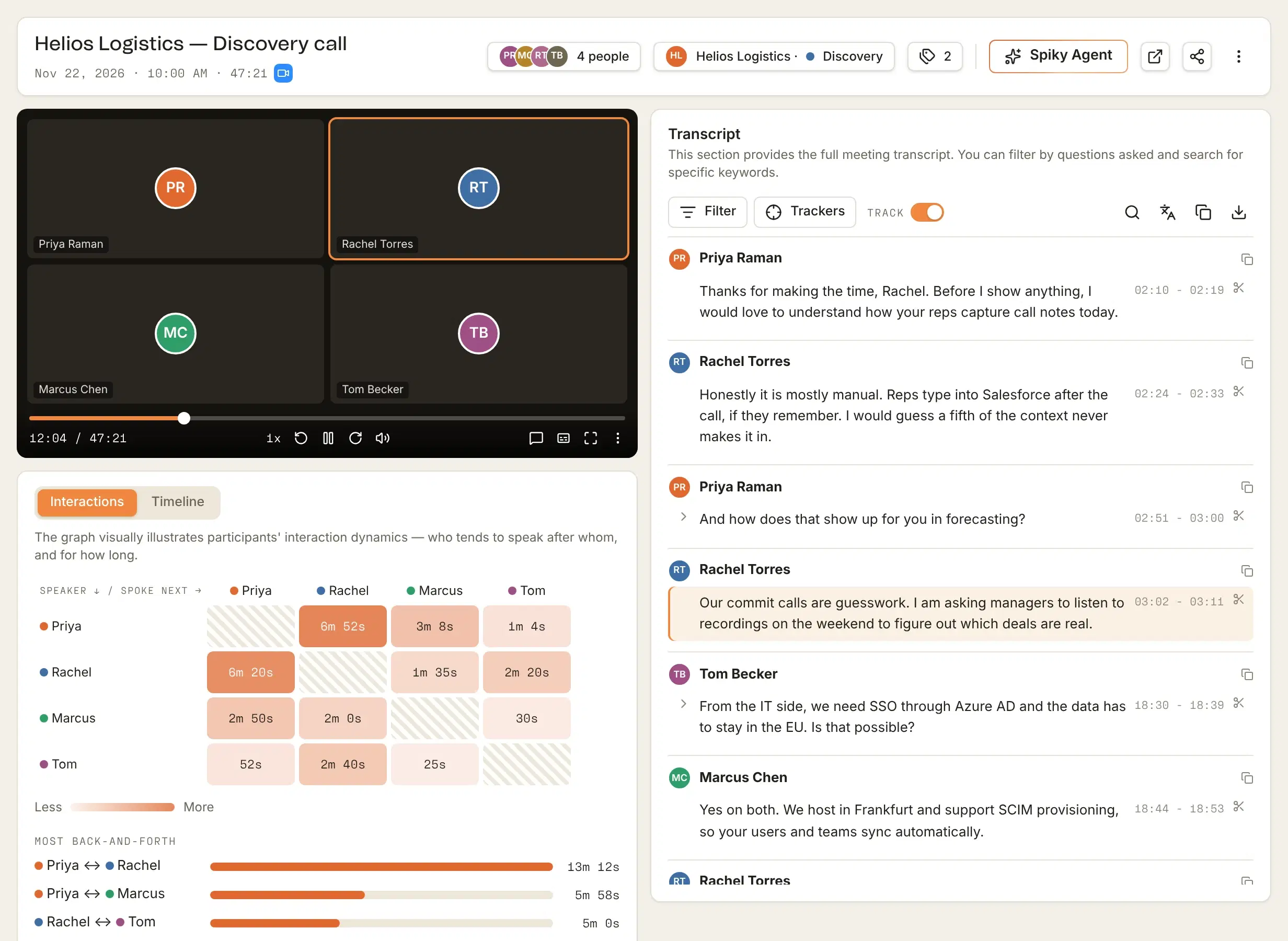
CURRENT SPIKY SCREEN WITH SAMPLE DATA
SUMMARY
A meeting summary in timestamped sections.
Read the call in a minute.
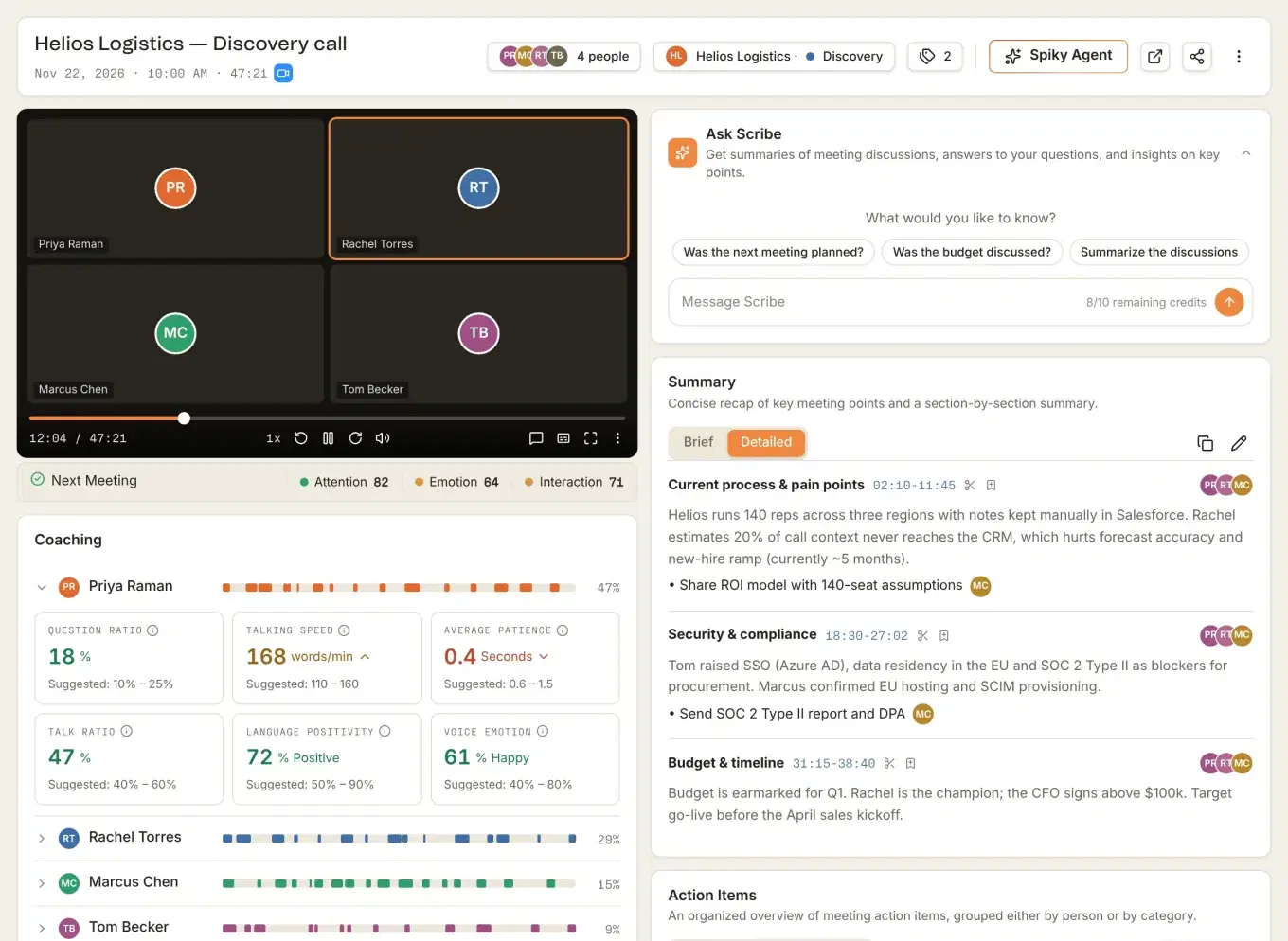
Each summary section carries its time range and the people in it, with the action items that came out of that part of the call. Switch between brief and detailed, edit the text, or copy it. Ask Scribe sits above it for anything the summary did not cover.
- Brief and detailed versions of every summary
- Action items grouped by person or by category
- Meeting templates add the topics that matter for each type of meeting
SHARING
Share notes, track customer information and recall the vital points.
The right people, the right access.
Search for a teammate or a team and choose editor or viewer. For someone outside the workspace, share the report instead.
- Editor or viewer, per person or per team
- A shared report for people outside the workspace
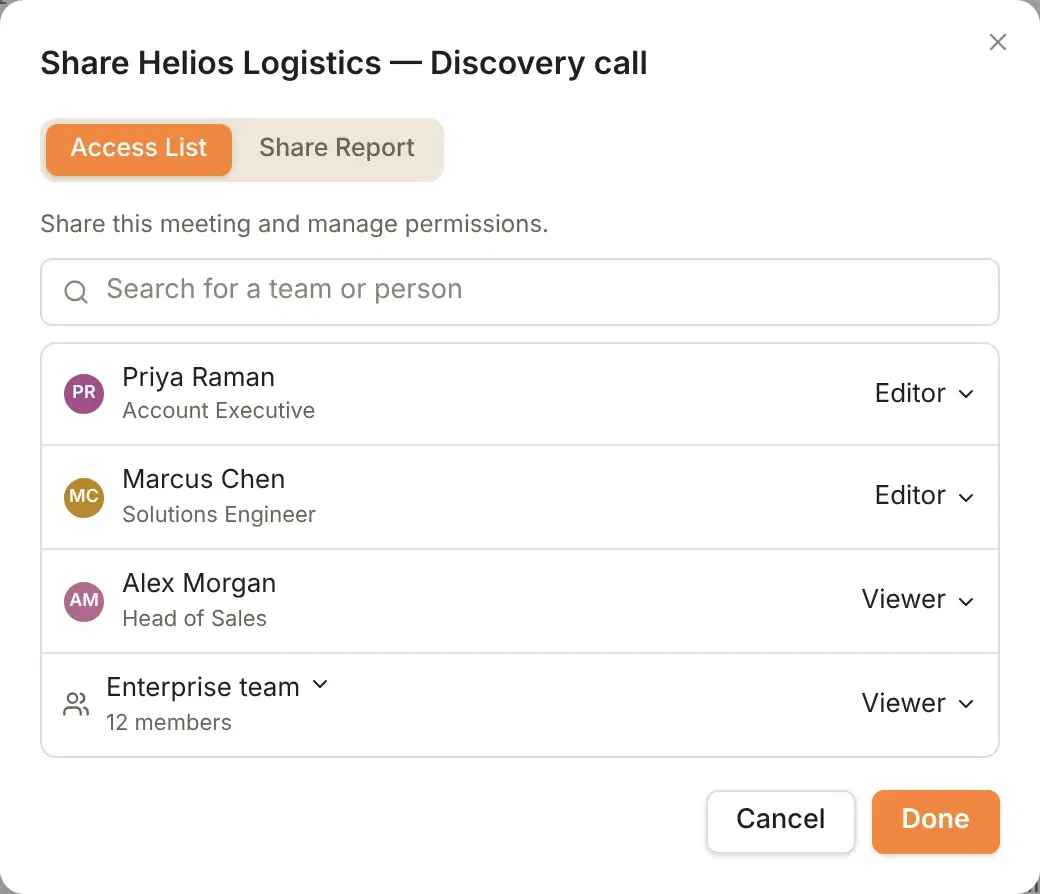
Share with a person or a team
Give a teammate or a whole team access to a meeting as an editor or a viewer.
Send it outside
A shared report gives someone outside your workspace the overview, transcript and moments of one meeting.
Talk about it where it happened
Comment on a meeting and share short clips, so feedback points at the moment itself.
Keep the customer record current
Meeting details, summaries, action items and transcripts sync to your deals and companies in your CRM, on Pro and Premium.
LANGUAGES
Spiky supports multiple languages.
Transcription in 100+ languages
Spiky transcribes conversations in 100+ languages and separates the speakers. Test it on your own recordings before you roll out.
More than one language in a meeting
Spiky detects the languages being spoken, so a conversation that moves between them is still transcribed line by line.
In-person meetings too
Spiky Mobile records face-to-face meetings on iPhone and Android, and the notes appear beside your online calls.
Spiky Mobile →Transcription and summaries are on every plan, including Free.
Topic detection, commenting and manual upload are on every plan too. Ask Scribe questions run from 40 on Free to 200 on Premium.
ACCURACY
Transcription accuracy you can check on your own calls.
Spiky transcribes 100+ languages and separates the speakers. Accuracy is counted as word error rate, a custom dictionary covers your own terms, and you can test it on your own recordings before you roll out.
WHAT WAS SAIDPlease send the SOC 2 report and the Helios rollout plan by Friday.
TRANSCRIPTPlease send the sock two report and the Helios roll out plan by Friday.
A dictionary for your terms
Your product names, people and abbreviations go into a custom dictionary, so the transcript spells them the way your team does.
Checked on your own recordings
Run your own calls through before you roll out, and read the result yourself.
CUSTOMERS
What customers say.
“My favorite feature of the Spiky platform is the detailed transcription it provides. The ability to capture all communication during an online meeting allows me to focus on the interaction rather than taking notes. The sentiment analysis is constructive in determining critical moments in meetings.”
 Jacob CheathamChief Strategy Officer · Venom Strategies
“Spiky makes it easy to coach the reps and ensure they correctly pitch our products. It is a valuable tool for improving our conversion rates throughout the funnel by more quickly qualifying leads. It has several handy features like a summary of the following steps and easy-to-understand analytics on performance.”
 Drew OlsenHead of GTM · Gynger.io
“The insights provided by Spiky are game-changing for Salesforce. The insights delivered hold power to enable and empower sales executives to empathize more with their customers, thereby understanding their value proposition and needs more deeply. This will ultimately lead to more sales conversions if used correctly.”
 Teijas KyHead of Business Development and Strategic Partnership · Wakelet
FAQ
Questions about transcripts and summaries.
What does Spiky give me after a meeting?
A speaker-separated transcript, a summary in timestamped sections, and action items grouped by person or by category. You can also ask Scribe any question about the call.
How does the meeting summary work?
Every summary comes in two lengths. Brief is a concise recap of the key points. Detailed goes section by section, and each section carries its time range and the people who spoke in it.
Can I search and filter a transcript?
Yes. Search for keywords, filter to the questions that were asked, and switch on trackers to see where the terms you follow came up. Transcripts can be copied and downloaded.
Can I edit a summary?
Yes. A summary can be edited and copied from the meeting page.
Can I ask questions about a meeting?
Yes. Ask Scribe answers questions about a call and points to the timestamp, so you can check the answer against the recording. Each plan includes a number of Ask Scribe questions, from 40 on Free to 200 on Premium.
Which languages are supported?
Spiky transcribes conversations in 100+ languages and separates the speakers. If your team works in a particular language, test it on your own recordings first.
How accurate is the transcription?
Accuracy is counted as word error rate: the words substituted, dropped or inserted, divided by the words spoken. A custom dictionary for product names, people and abbreviations helps Spiky get your own terms right, and you can test it on your own recordings before you roll out.
What happens when a meeting has more than one language?
Spiky detects the languages being spoken, so a conversation that moves between them, for example between Turkish and English, is still transcribed line by line.
How do I share notes with someone?
Share a meeting with a person or a team as an editor or a viewer, or send a shared report to someone outside. Teammates can comment on a meeting and share short clips from it.
Does it work for recordings I already have, or for in-person meetings?
Yes. Recordings made on another tool can be uploaded, and Spiky Mobile records meetings in the room on iPhone and Android. Both get the same transcript and summary.
Which plans include transcription and summaries?
Every plan, including Free. Transcription, meeting summarization, topic detection and commenting are on all of them.

STOP TAKING NOTES
Get the transcript and summary of your next call.
Record one meeting and read it back: the transcript, the summary and the action items, with nobody typing during the call.