With CRM integration, enrich and update the status of sales opportunities and minimize synchronization time for team members.
Written to CompanyDeal in HubSpot
- Participants
- Priya Raman, Marcus Chen, Rachel Torres, Tom Becker
- Public link
- A link to the meeting report in Spiky
- Brief summary
- Helios runs 140 reps with manual note-taking; forecast accuracy and ramp are the main goals. Security (SSO, EU residency, SOC 2) gates procurement. Budget earmarked for Q1.
- Action items by people
- Marcus Chen: send SOC 2 Type II report and DPA. Priya Raman: share ROI model with 140-seat assumptions. Rachel Torres: confirm attendees for technical validation.













 4.8 / 5
How it works
What does CRM integration do?
With Spiky's CRM integration, you can effortlessly synchronize meeting insights with your existing sales opportunities. This enhances your team's efficiency and effectiveness, freeing you to concentrate on sealing deals rather than engaging in routine tasks.



Native CRMs
Salesforce, HubSpot, Pipedrive and Zoho CRM. Sugar CRM is set up together with our team.
What is synced
Meeting details, summaries, action items and transcripts, written to the companies, deals and contacts you choose.
Who connects
Each person connects their own CRM login, under Settings, Integrations, Personal, CRM.
Matching
Meetings find their records through the participants' email addresses and domains. No manual tagging.
Other CRMs
Reach Close, Copper, Freshsales and others through Zapier.
Disconnecting
Disconnect whenever you like. Notes already synced stay in your CRM.
In the product
Set it once. Every call follows it.
Three screens decide what reaches your CRM: the connection, the note, and the playbook fields.
Connect your CRM in one place.
The Integrations screen holds a CRM block. Connect it once and Spiky syncs meeting details, summaries, action items and transcripts with your deals and companies.
- Salesforce, HubSpot, Pipedrive and Zoho CRM
- One personal connection per rep, under the Personal tab
- Sugar CRM on request
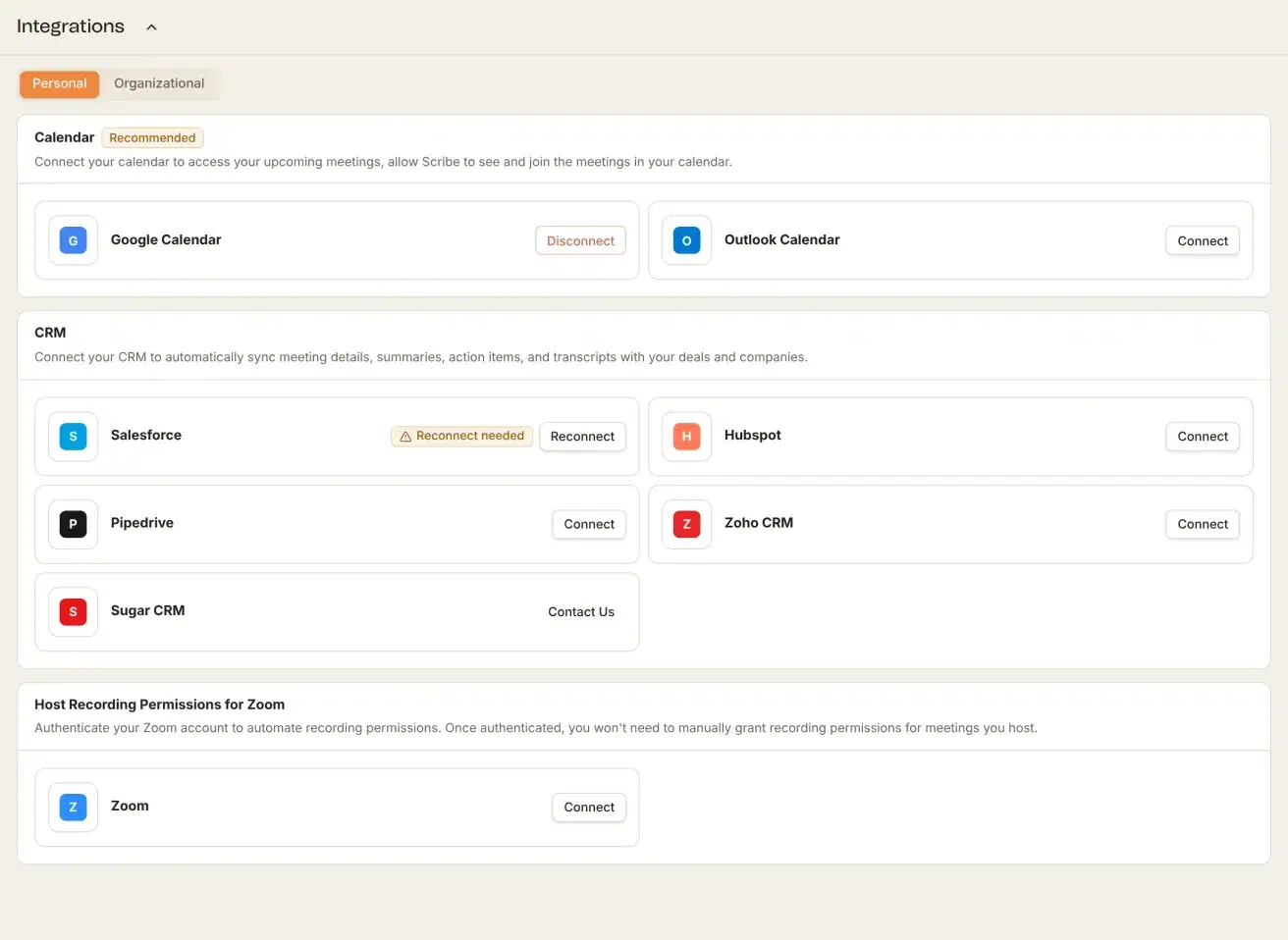
Each rep connects their own login.
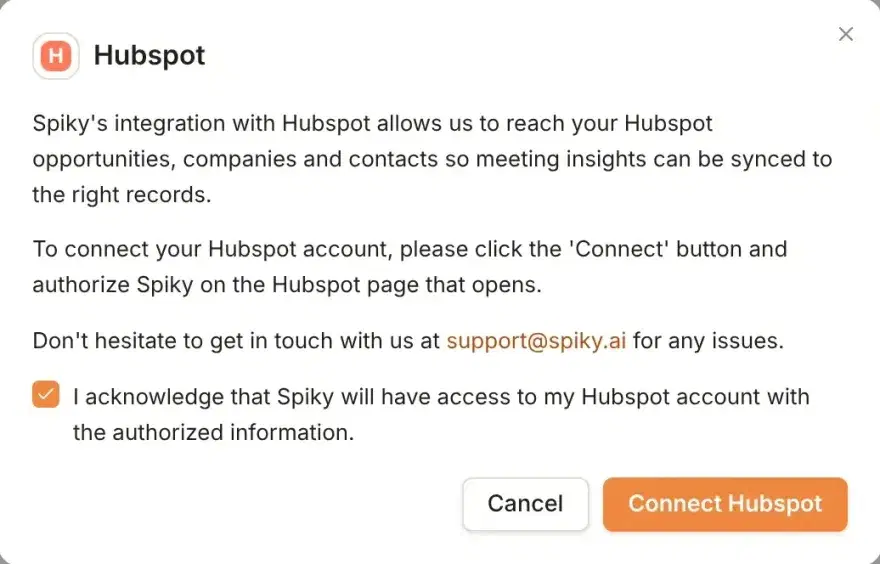
The connection is personal. Each person authorizes Spiky with their own CRM account; a teammate connects their own.
- 1. Settings, Integrations, Personal tab
- 2. Click Connect on your CRM and acknowledge the dialog
- 3. Sign in on the CRM's own page and approve
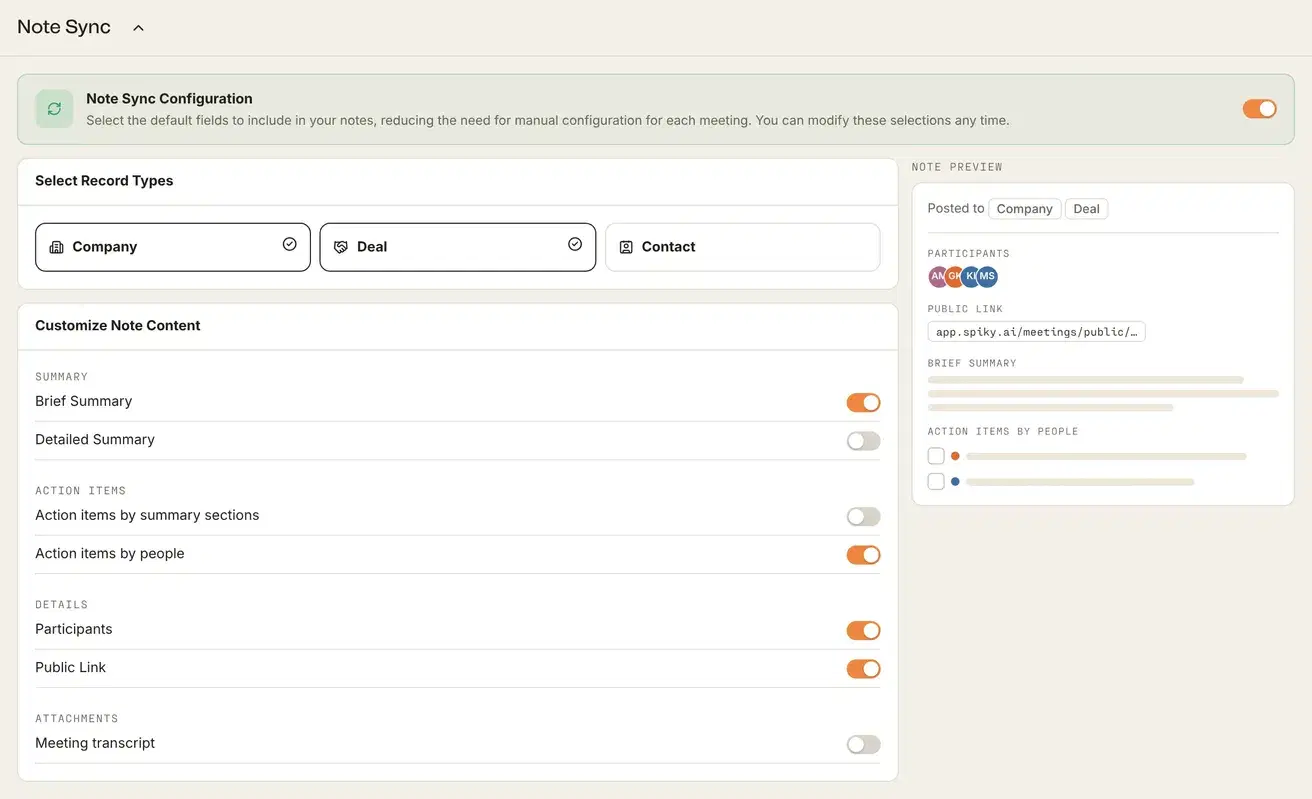
Decide what the note says, and where it goes.
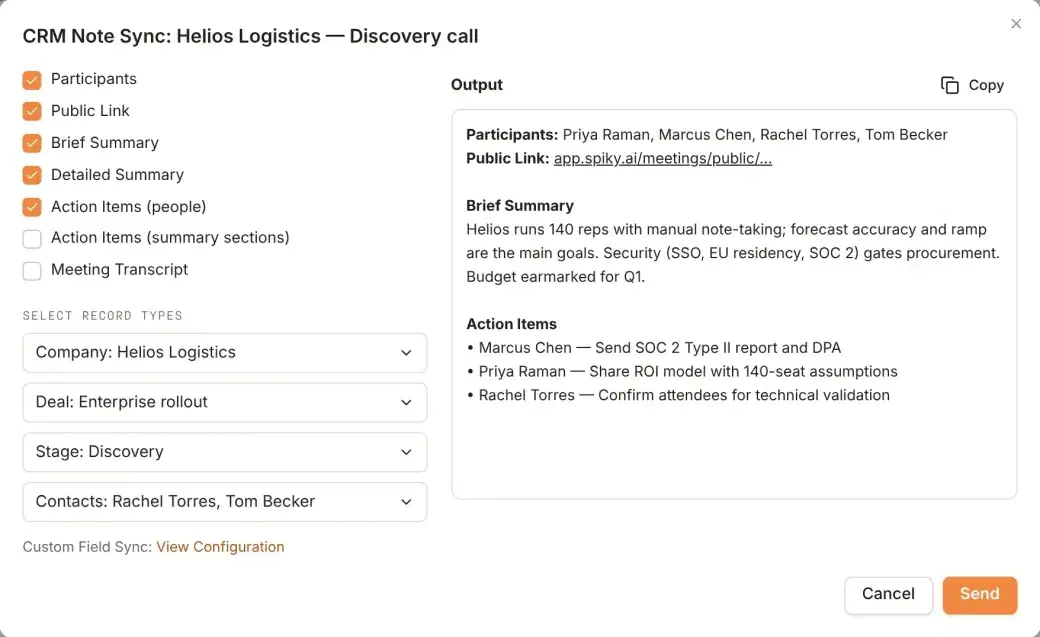
Note Sync sets your defaults: which record types get a note (company, deal, contact) and which sections it holds. A preview on the right shows the note as it will be written.
- Seven sections: participants, public link, brief and detailed summary, action items two ways, transcript
- The transcript is saved as a separate note
- Defaults can be changed for a single meeting
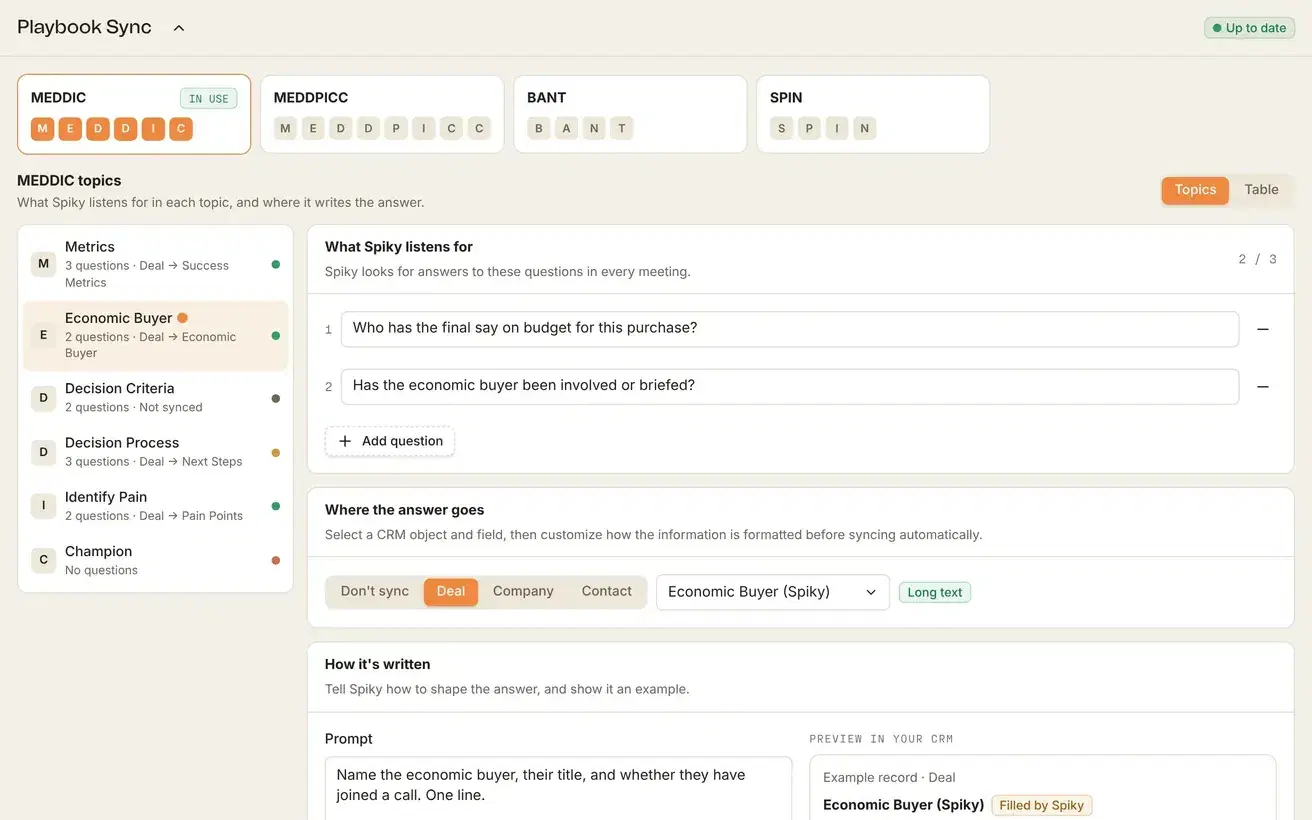
Fill your qualification fields from the call.
Pick a framework, MEDDIC, MEDDPICC, SPIN or BANT, write the question each criterion should answer, and map it to a field on a CRM object. Spiky fills the field from what was said.
- Your own question for each criterion
- Mapped to a CRM object and custom field
- Use long text fields of 1,000 characters or more
Change the note before it is sent.
Your defaults apply to every call. For a single meeting, open CRM Note Sync from its analysis and adjust before you send.
- Switch a section on or off for this meeting only
- Check the linked company, deal and contact
- Sync when it reads right
Matching
How a meeting finds its record.
Nobody tags a call. Spiky reads who was in the meeting and looks them up in your CRM.
1. Contact
Spiky checks the email addresses of external participants against the contacts already in your CRM.
2. Company
If a participant's email domain matches a company in your CRM, the meeting is linked to that company.
3. Deal
If that contact or company has an open deal, the meeting is linked to the deal as well.
4. No match
A brand-new prospect with no record yet can be linked by hand from the meeting page.
Record types
Company, deal and contact. Choose any combination.
Deals page
Matched meetings also build the pipeline view. See Deal Flow →
HubSpot permissions
The person connecting needs view, edit and delete permission on companies and deals, and App Marketplace access. A HubSpot admin can grant them.
Zoho CRM
Why connect it
A pipeline that matches the conversations.
Take control of your sales pipeline
Spiky's CRM integration offers an enhanced grasp of both existing customers and potential leads. By consolidating data and leveraging advanced analytics, it delivers valuable insights to spot opportunities and streamline workflows. Seize command of your sales pipeline through the robust CRM integration offered by Spiky.
Increase visibility and improve accuracy
Spiky's CRM integration enhances sales opportunities by offering current customer information, streamlining workflows, and aiding in the identification of areas for improvement. Through a comprehensive view of the sales pipeline, teams can monitor progress and make well-informed decisions.
CRM integrations start on the Pro plan.
Custom-field CRM integration is on Premium. Calendar integration, Spiky Scribe, transcription and meeting summaries are on every plan, including Free.
Customers
What teams say about Spiky.
“My favorite feature of the Spiky platform is the detailed transcription it provides. The ability to capture all communication during an online meeting allows me to focus on the interaction rather than taking notes. The sentiment analysis is constructive in determining critical moments in meetings.”
 Jacob CheathamChief Strategy Officer · Venom Strategies
“Spiky makes it easy to coach the reps and ensure they correctly pitch our products. It is a valuable tool for improving our conversion rates throughout the funnel by more quickly qualifying leads. It has several handy features like a summary of the following steps and easy-to-understand analytics on performance.”
 Drew OlsenHead of GTM · Gynger.io
“The insights provided by Spiky are game-changing for Salesforce. The insights delivered hold power to enable and empower sales executives to empathize more with their customers, thereby understanding their value proposition and needs more deeply. This will ultimately lead to more sales conversions if used correctly.”
 Teijas KyHead of Business Development and Strategic Partnership · Wakelet
FAQ
Frequently asked questions
Which CRMs does Spiky connect to?
Salesforce, HubSpot, Pipedrive and Zoho CRM connect natively. Sugar CRM is set up with our team, and other CRMs can be reached through Zapier.
What does Spiky write to the CRM?
A meeting note with the sections you choose: participants, a public link, a brief or detailed summary, action items by section or by person, and the transcript as a separate note.
How does a meeting get matched to a record?
By its participants. Email addresses are matched to contacts, email domains to companies, and an open deal on either is linked too. Unmatched meetings can be linked by hand.
Does every rep need to connect?
Yes. The CRM connection is personal: each person connects their own CRM login under Settings, Integrations.
Can Spiky fill custom CRM fields?
Yes. Playbook Sync maps each criterion of MEDDIC, MEDDPICC, SPIN or BANT to a CRM object and custom field. Custom-field CRM integration is on the Premium plan.
What happens if I disconnect?
Syncing stops. Everything already written to your CRM stays there.

Make every call matter
Let the CRM fill itself in.
Connect it once. The next call updates the deal.