Automatically sync meeting insights into Zoho CRM, eliminating manual data entry and giving your team the full picture, so reps can stay focused on selling instead of admin work.
- ✓Found: Rachel Torres is on the inviteAn external participant with a company email address.
- ✓Found: Contact found in Zoho CRMHer email address matches an existing contact.
- ✓Found: Account: Helios LogisticsThe email domain matches the account.
- ✓Found: Open deal: Enterprise rolloutThe note is written to the contact, the account and the deal.
Everything links by itself.
The contact, the account and the open deal all get the meeting note. Nobody opens Zoho CRM to make it happen.
- ✓Found: Tom Becker joins from ITHe has never been in a call before.
- ✕Not found: No contact with that emailHe is not in Zoho CRM yet.
- ✓Found: Account: Helios LogisticsHis email domain matches the account.
- ✓Found: Open deal: Enterprise rolloutThe note is written to the account and the deal.
The company is enough.
When the person is new but the email domain belongs to a company in your CRM, the meeting is linked to that company and to its open deal.
- ✓Found: A first call with a new companyNobody from it is in Zoho CRM.
- ✕Not found: No contact with that emailNo match.
- ✕Not found: No account with that domainNo match.
- ?Manual step: Link it by handPick the record from the meeting page and the note syncs there.
Link it from the meeting page.
A brand-new prospect has no record to match. Create the record in Zoho CRM, then link the meeting to it from the meeting page.













 4.8 / 5
How it works
What does Zoho CRM integration do?
Spiky seamlessly syncs meeting insights into Zoho CRM, eliminating manual data entry and ensuring your team always has the full context. Each call is analyzed for key signals, so your reps can focus on selling, not typing.
Seamless Integration with Zoho CRM
Spiky.ai connects natively with Zoho CRM, automatically enriching Deals, Contacts, and Accounts with meeting intelligence. Every call is automatically analyzed and synced back into Zoho CRM, giving you a complete picture of customer interactions without any manual work.
- Deals, Contacts and Accounts
- Summaries, action items and participants
- No manual data entry
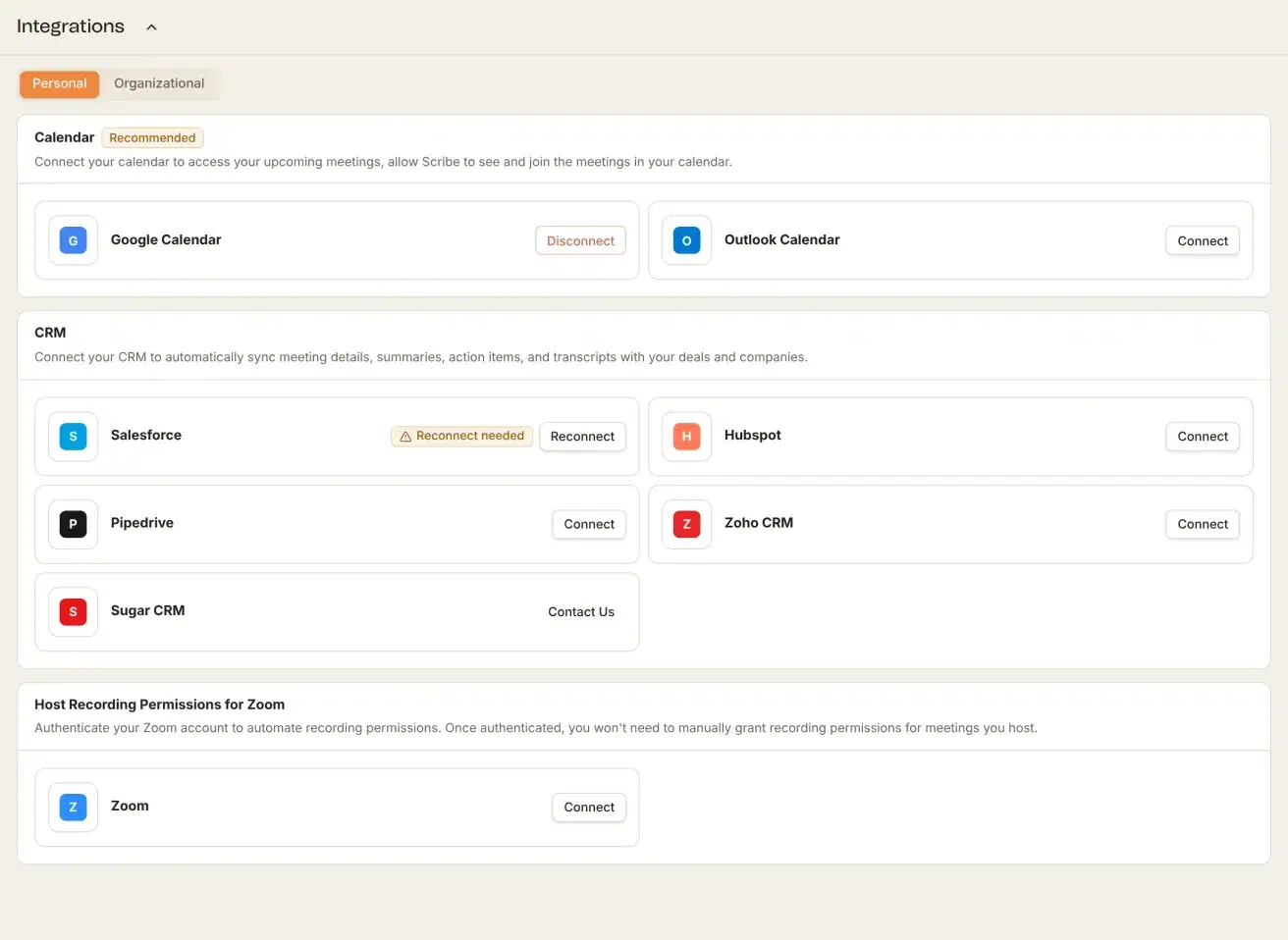
Connect Spiky.ai with Zoho CRM in Minutes
1. Open Integrations
In Spiky go to Settings, Integrations, and open the Personal tab.

2. Connect Zoho CRM
In the CRM block choose Zoho CRM and click Connect.
3. Sign in to Zoho
Approve the access request with your own Zoho account.
4. Set your defaults
Under CRM Setup choose the record types and the note content. The next call syncs.
Enable the Zoho CRM integration directly through Zoho Marketplace or inside the Spiky.ai platform. No coding, no configuration complexity. Install from Zoho Marketplace
Before you start
A Spiky plan with CRM integration (Pro and above) and your own Zoho CRM login.
Where
Settings, Integrations, Personal, CRM. Or start from Zoho Marketplace.
Per person
The connection is personal. Each rep connects their own Zoho account.
Disconnecting
Stops the sync. Notes already in Zoho CRM stay there.
What it enables
What Spiky.ai + Zoho CRM enables
Automatic Meeting Note Sync
Spiky processes every call and updates the relevant CRM record with summaries, action items and participants; fully automated.
Up-to-Date Pipelines
Deal notes stay aligned with real conversations, eliminating missing context.
More Selling Time, Less Admin Time
Reps no longer waste hours writing call notes or updating CRM fields; Spiky does it automatically.
Better Forecasting with Richer Context
Leaders see what was said on every deal, and Playbook Sync fills qualification fields, directly inside Zoho CRM.
What gets written
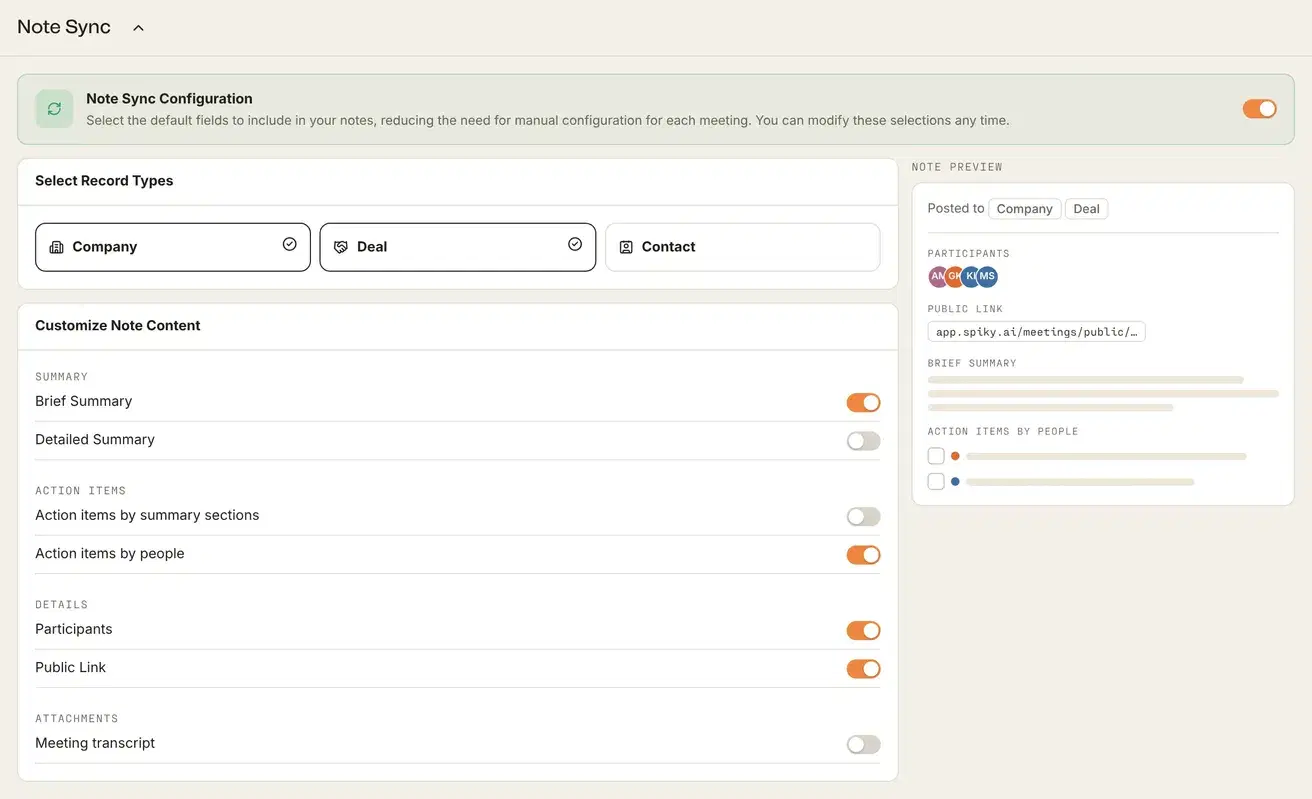
Choose what lands in Zoho CRM.
The same two settings screens drive every native CRM, Zoho CRM included.
The note, section by section.
Choose the record types that get a note and the sections it holds: participants, a public link, a brief or detailed summary, action items by section or by person, and the transcript as a separate note.
- A live preview of the note
- Defaults for every meeting
- Change them for a single meeting before syncing
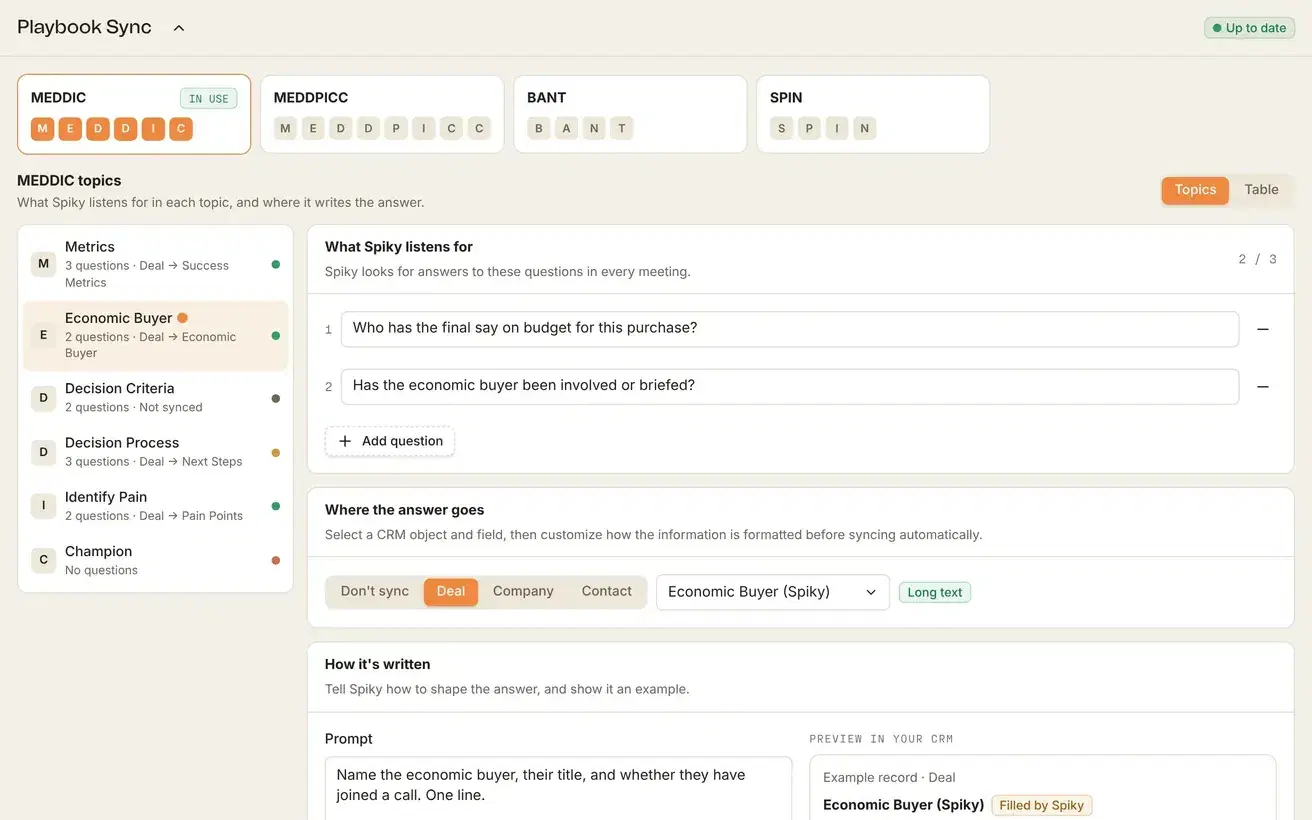
Qualification fields, filled from the call.
Map each criterion of MEDDIC, MEDDPICC, SPIN or BANT to a field in Zoho CRM. Spiky answers the question you wrote for it from the conversation and fills the field.
- Four frameworks built in
- Your own question per criterion
- Long text fields of 1,000 characters or more work best
CRM integrations start on the Pro plan.
Custom-field CRM integration, used by Playbook Sync, is on Premium.
Customers
What teams say about Spiky.
“My favorite feature of the Spiky platform is the detailed transcription it provides. The ability to capture all communication during an online meeting allows me to focus on the interaction rather than taking notes. The sentiment analysis is constructive in determining critical moments in meetings.”
 Jacob CheathamChief Strategy Officer · Venom Strategies
“Spiky makes it easy to coach the reps and ensure they correctly pitch our products. It is a valuable tool for improving our conversion rates throughout the funnel by more quickly qualifying leads. It has several handy features like a summary of the following steps and easy-to-understand analytics on performance.”
 Drew OlsenHead of GTM · Gynger.io
“The insights provided by Spiky are game-changing for Salesforce. The insights delivered hold power to enable and empower sales executives to empathize more with their customers, thereby understanding their value proposition and needs more deeply. This will ultimately lead to more sales conversions if used correctly.”
 Teijas KyHead of Business Development and Strategic Partnership · Wakelet
FAQ
Frequently asked questions
How do I connect Zoho CRM?
Install Spiky from Zoho Marketplace, or connect inside Spiky under Settings, Integrations, Personal, CRM. Sign in with your Zoho account and approve the access request.
Which Zoho CRM records does Spiky update?
Deals, Contacts and Accounts get a note with the meeting's details after each call.
What is written after a call?
A note with the sections you choose, such as participants, a summary and action items, and optionally the transcript as a separate note.
How does Spiky know which record a call belongs to?
It matches external participants' email addresses to contacts, their email domain to a company, and links an open deal on either. A brand-new prospect can be linked by hand from the meeting page.
Which plan includes the Zoho CRM integration?
CRM integrations start on the Pro plan. Custom-field sync is on Premium.
What happens to my notes if I disconnect?
Syncing stops, and everything already written to Zoho CRM stays there.

Zoho CRM
Meeting intelligence, inside Zoho CRM.
Install it from Zoho Marketplace or switch it on inside Spiky.